We earn a commission if you buy through our links, at no extra cost to you.
Best Security Camera System for a Small Business
Choosing cameras for a shop, office or warehouse: 24/7 local recording, PoE, entrance and register coverage, retention, state audio laws, signage and insurance.
At a glance
For a small business, the Reolink RLK8-811B4 is the pick: wired PoE cameras that record around the clock to a local recorder with no monthly alert fee. The eufyCam S3 Pro and Ring Floodlight Cam 4K Pro suit an exterior lot or loading area, and the Arlo Pro 5S 2K fits one hard-to-wire spot.


A shop, small office or warehouse wants something different from a home camera. The goal is a record that you can pull up weeks later when a register comes up short, a customer says they fell or a delivery goes missing. That points to continuous recording, a way to keep footage you own and coverage of a few specific places rather than a pretty view of the parking lot. It also comes with legal obligations that a living room camera does not have.
This guide walks through what to cover, how to record, how long to keep footage and what the law and your insurer may expect. It then places four models from our best security cameras of 2026 comparison. We do not run our own measurements, and the figures below come from the manufacturers’ pages.
What a Small Business Needs From Cameras
Start with the jobs, not the gear:
- Identify people at the door. A clear face at a normal height as customers or staff enter.
- Watch cash handling. The register, the safe area and the counter where money changes hands.
- Protect stock. The stockroom door, the loading dock and aisles with high-value items.
- Show the outside. The parking lot or alley after hours, where break-ins and vandalism usually start.
- Keep records. Enough days of footage that you can look back, and a way to export a clip.
Most small sites do well with four to eight cameras. Coverage beats resolution: a camera aimed at the right door is worth more than a 4K camera aimed at a wall.
Wired PoE or Wire-Free
For constant recording, wired Power over Ethernet (PoE) is the standard. One cable per camera carries power and video, and a recorder in a back room stores everything on a hard drive. There are no batteries to change and no dependence on Wi-Fi in a metal-walled warehouse. The cost is installation: someone has to run the cable, either you or a low-voltage installer.
Wire-free cameras are quicker to install and can go where no cable runs. The trade-offs are battery upkeep, Wi-Fi range and recording that usually starts on motion rather than running all day. They fit an exterior corner, a leased space where you cannot drill much or a temporary site. They are less suited to being your only system.
If you lease, check your lease before you drill or mount anything on the exterior, and ask the landlord about shared hallways, lots and entrances.
Local Recording, Cloud and Retention
Local recording means footage sits on a drive in your building. It has no monthly fee and it is quick to play back, but a thief who finds the recorder can take it. Put the recorder out of sight, in a locked closet or office.
Cloud recording sends video off site, so it survives theft or fire but typically comes with a plan. Arlo, for example, says its Arlo Secure service, including cloud recording, requires a paid subscription after the trial, and lists 30 days of viewable cloud video. Ring lists video search and extended features as subscription items.
How long should you keep video? There is no universal answer. Set it by how quickly you find problems. A shop that counts the register nightly might be fine with a week or two. A warehouse that audits inventory monthly needs a longer window. Reolink says the 2 TB drive in its kit holds about 8 days of footage with four cameras at the default bitrate, and the recorder can take up to 16 TB, so retention is a drive-size decision. Save and back up any footage tied to an incident immediately, since routine recording overwrites old video.
Where to Put the Cameras
- Entrance, at face height. About head height, facing the people who walk in, so you capture faces rather than hats. A camera looking down from the ceiling shows the top of heads.
- Register, from above and behind. The counter, the cash drawer and the customer’s hands, without capturing card keypads or PIN pads.
- Stockroom door and the stockroom itself. The doorway and the high-value shelves.
- Loading dock or back door. Often the weakest point.
- Parking lot or alley. Floodlights or a camera with a light help after hours.
Keep cameras away from restrooms, changing areas and anywhere staff have a reasonable expectation of privacy.
Audio Recording: Check Your State
Video and sound are treated differently. Federal law sets a one-party consent floor for recording conversations, and states may be stricter. The Reporters Committee for Freedom of the Press lists about 11 states that primarily require everyone’s consent: California, Delaware, Florida, Illinois, Maryland, Massachusetts, Michigan (at least for recordings by a third party), Montana, New Hampshire, Pennsylvania and Washington. It adds that Connecticut and Nevada require all-party consent for phone calls, Missouri and Oregon for in-person conversations, and Hawaii and Maine in particularly private places.
A business camera with a microphone records customers and staff who never agreed to it, and you are not a party to their conversations. In an all-party state, that can be a problem. The simplest approach is to turn audio off at the register and in common areas, and record video only. If you need audio, for example for two-way talk at a delivery door, get advice from an attorney first. The Reporters Committee guide says it is not a substitute for legal advice, and neither is this page.
Signs, Employee Notice and Where Not to Record
Rules differ by state. Super Lawyers, a legal directory, says there is no comprehensive federal law on workplace video, so state law controls. It says Connecticut requires employers to notify employees about cameras and marks California, Delaware, Maine and New York as notice states. It also says restrooms, locker rooms, changing rooms and employee lounges are off limits and that Section 7 of the National Labor Relations Act protects employees from surveillance of union activity. A Kelley Drye employment lawyer’s post adds a cautionary example, in which an employee used a server room for lactation and later found it had a monitored camera.
Sensible practices, hedged for your state:
- Post a visible sign at entrances saying video recording is in use.
- Give employees written notice of where cameras are and why, and keep a dated copy.
- Never place a camera in a restroom or changing area.
- Limit who can view footage and keep a note of who exports it.
- Check state law or ask an employment attorney before you finalize.
Insurance
Some commercial insurers ask about cameras, and some give credit for them, but practice varies by carrier. Do not buy a system just for a discount. Ask your agent in writing what the insurer wants, such as visible cameras, a minimum retention period, professional monitoring or an installer’s certificate. Keep receipts and a short record of the install date and camera locations.
Reolink RLK8-811B4: The Core Recorder-Based Choice
Four wired 4K PoE cameras and an 8-channel recorder with a 2 TB drive, built for continuous local recording with no monthly alert fee. Our pick for a shop, office or small warehouse where cable can be run.
According to Reolink, the kit has four 8 MP cameras with 5X optical zoom, IP67 bodies and spotlights, plus an NVR with 8 PoE ports, a 2 TB drive and support for up to 16 TB. It lists person, vehicle and animal detection, no monthly fee for alerts and a two-year limited warranty. The page says up to 12 Reolink cameras in total can be added, which leaves room to grow beyond the four in the box.
The optical zoom helps at the front door and register, where you want a face, not just a figure. The limits are practical: cables go to every camera, two-way talk works only through the Reolink app, and the page lists no Alexa or Google Home support. Eight days of footage on the included drive may not be enough for a business that audits monthly. See our Reolink RLK8-811B4 profile for more.
eufyCam S3 Pro: Wire-Free Coverage for a Lot or Loading Area
Two solar-assisted 4K cameras with a hub that stores video locally with no monthly fee. A fit for an exterior wall or loading area with no cable run, not a replacement for a recorder.
eufy says the cameras record to the HomeBase S380, which has 16 GB of built-in storage and takes a drive up to 16 TB. Radar-and-PIR detection reaches up to 40 feet, according to eufy, and the IP67 body suits outdoor use. The key business limit is recording style. The page lists a 24/7 snapshot feature, which takes periodic photos between motion events, and lists continuous recording as in development, so it will not give you a full-day record of the register. Use it as an add-on for the outside, or a leased unit where drilling is a problem. The eufyCam S3 Pro profile covers solar placement.
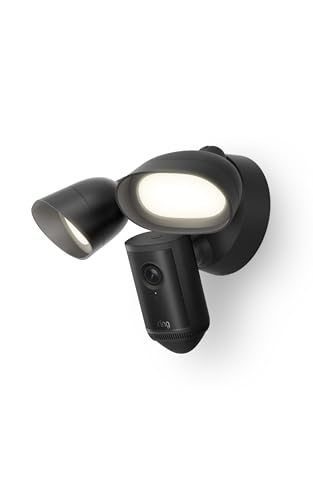
Ring Floodlight Cam 4K Pro: A Lit Back Door or Lot
A hardwired 4K camera with two 2,000-lumen floodlights and a siren, for a back door, loading bay or small lot where there is already wired power. Smart alerts and search need a Ring plan.
Ring lists a 140-by-85-degree view, floodlights that reach up to 65 feet and hardwired 100 to 240V power with a note that a qualified electrician may be required. Person and vehicle detection, extended live view and video search require a compatible Ring subscription, according to Ring. For a business, it makes sense as a deterrent over a delivery door or lot, not as the system that watches the register. If you rent, ask the landlord before you replace a fixture. See the Ring Floodlight Cam 4K Pro profile.
Arlo Pro 5S 2K: One Hard-to-Wire Spot, With a Plan
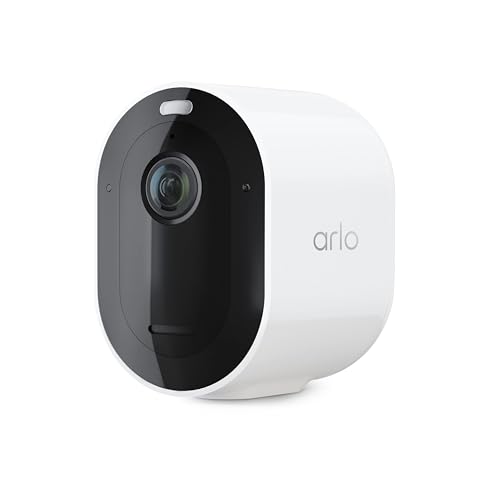
A wire-free 2K camera with a built-in spotlight and a 160-degree view. Reasonable for one hard-to-wire spot if you accept an Arlo Secure plan for cloud video.
Arlo’s datasheet lists 2K HDR video, a 160-degree diagonal view, night vision up to 25 feet and adjustable motion detection up to 25 feet, with rechargeable battery and AC power options. It also says Arlo Secure service, including cloud recording, requires a paid subscription after the trial period. That short night range suits a doorway or a tight space, not a lot. A business that needs to pull up footage weeks later should consider the plan cost and the battery upkeep first. Details are in our Arlo Pro 5S profile.
A Simple Way to Decide
- Several cameras, constant recording: the Reolink kit, with someone to run the cable.
- A lot or loading area, no cable: the eufy kit, as a supplement.
- A lit back door with power: the Ring, if a plan is acceptable.
- One awkward spot: the Arlo, with a plan.
Many small businesses end up with a wired core system plus one or two wire-free cameras at the edges. Whatever you buy, write down where each camera is, set the recorder’s clock correctly and check after a week that the footage actually covers the doors and register.
Sources
- Reolink RLK8-811B4-A official product page, Reolink
- eufyCam S3 Pro official product page, eufy US
- Floodlight Cam 4K Pro support and tech specs, Ring
- Arlo Pro 5S 2K datasheet (VMC4060P), Arlo
- Introduction to the Reporter’s Recording Guide, Reporters Committee for Freedom of the Press
- Is It Legal To Install Cameras in the Workplace for Surveillance?, Super Lawyers
- Workplace Video Monitoring: What Employers Need to Know, Kelley Drye
Frequently asked questions
Do I need an NVR for a small business security camera system?
Not strictly, but a network video recorder (NVR) is the usual choice when you want continuous recording on site. Reolink says its kit records to an NVR with a pre-installed 2 TB drive and no monthly fee for alerts. Wire-free cameras generally record only when they detect motion, and eufy lists periodic snapshots between events instead of continuous video.
How long should a small business keep camera footage?
There is no single rule for most small shops. Retention is usually set by your needs: how quickly you notice theft, how long disputes take and what your insurer or landlord asks for. Reolink says the 2 TB drive in its kit holds about 8 days with four cameras at the default bitrate, so a longer window means a larger drive or lower bitrate. Save and back up any clip tied to an incident.
Can I record audio at my business?
Be careful. Federal law is one-party consent, but according to the Reporters Committee for Freedom of the Press about 11 states primarily require every party's consent, including California, Florida, Illinois, Massachusetts, Pennsylvania and Washington. Customers and employees talking are third parties. Many owners record video only. Check state law before you enable any microphone. This is general information, not legal advice.
Do I have to tell employees and customers about cameras?
Some states require notice and others do not. Super Lawyers says Connecticut requires employers to notify employees about cameras, and lists California, Delaware, Maine and New York as notice states. Clear signs at the entrance and a written notice to staff are widely recommended and cheap. Check your state's rules or ask an employment attorney.
Where should cameras not go in a business?
Restrooms, locker rooms, changing areas and, in many states, break rooms. Super Lawyers says restrooms, locker rooms, changing rooms and employee lounges are off limits, and notes that California, Connecticut, Delaware and New York restrict surveillance in such areas. Federal labor law also protects employees from surveillance of union activity.
Will security cameras lower my business insurance?
Maybe. Insurers weigh cameras differently, and some want proof of installation or professional monitoring. Do not assume a discount. Ask your agent in writing what equipment, placement and documentation they want before you buy.