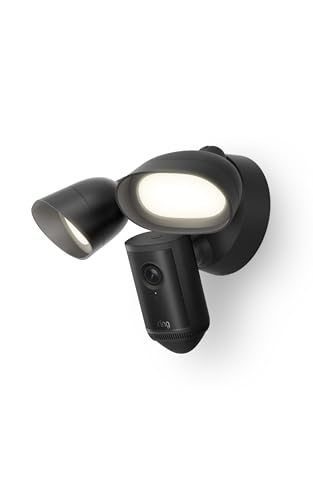
The Ring Floodlight Cam 4K Pro (2nd Gen) is Ring’s top wired floodlight camera, with 4K video, two bright floodlights and a built-in siren in one fixture. It is made for a spot where you already have power, such as a garage, a driveway or the back of the house. In our ranking of the best security cameras of 2026, it is the choice for a bright, hardwired outdoor camera.
We do not run our own measurements. The figures below come from Ring’s official support page for the Floodlight Cam 4K Pro and its subscription feature page, and we credit Ring for each one. Where Ring gives no number, we say so.
The Short Version
According to Ring, the camera records 4K (3840 x 2160) video with night vision, sees 140 degrees horizontally and 85 degrees vertically, and carries 2,000-lumen motion-activated floodlights that reach up to 65 feet. It has 3D motion detection with camera motion zones, an 85 dB siren and two-way talk. It is hardwired, uses Wi-Fi 6 and is weather resistant to IP65.
The main catch is the wiring. Ring says installation by a qualified electrician may be required in your area. The second catch is the subscription, because the features that make a Ring camera smart sit behind a plan.
Key Specs According to Ring
- Video: 4K (3840 x 2160) with night vision. Ring says quality depends on bandwidth and device temperature, and 4K requires 15 Mbps.
- Enhanced Zoom: Ring lists Retinal 4K with Enhanced Zoom but gives no zoom factor on the support page.
- Field of view: Camera 140 degrees horizontal and 85 degrees vertical. Floodlights 270 degrees horizontal and 75 degrees vertical.
- Lights: 2,000-lumen motion-activated floodlights, up to 65 feet, 3000K.
- Siren: Remote-activated 85 dB siren, measured at 3 feet (1 m).
- Motion detection: 3D Motion Detection with camera motion zones.
- Audio: Two-Way Talk with Audio+.
- Power: Hardwired, 100 to 240V input, 12 VDC and 15.4W output.
- Wi-Fi: 802.11 b/g/n/ax (Wi-Fi 6) on 2.4 GHz and 5 GHz.
- Weather: IP65, operating range from -4°F to 122°F.
- Size: 8.7 x 12.8 x 7.8 inches.
- Mounting: Adjustable-angle base for a wall or ceiling, on a vertical or horizontal surface.
- Other features: Privacy zones and sidewalk compatibility.
- Smart home: Works with Alexa.
- In the box: Camera, installation hardware, quick start guide, warranty and safety document and a security sticker. Ring lists a Plug-In Mount as a compatible accessory.
Ring’s support page does not list a warranty length, so we leave it out.
Subscriptions: What Is Free and What Needs a Plan
Ring’s own pages are clear about where the plan line sits.
Not tied to a subscription on Ring’s page:
- Real-time notifications and remote control through the Ring app.
- Privacy zones.
- Sidewalk compatibility.
Requires a compatible Ring subscription, according to Ring:
- Person and vehicle detection.
- Extended and continuous live view.
- Video search.
- Advanced pre-roll.
Ring’s support center currently lists the tiers as Ring Solo, Ring Multi, Ring Pro and Virtual Security Guard, and says each plan includes the features of the previous tier. It describes Solo as covering smart alerts, device modes, extended live view and video preview alerts, Multi as adding picture-in-picture live view, and Pro as adding video search, video descriptions and local storage with Ring Edge and Ring Alarm Pro. We give no plan costs because we did not open a Ring page that lists current ones, and plan names have changed more than once.
What Ring’s pages do not say is whether the camera saves clips without a plan. Plan on paying for a subscription if you want searchable saved video and smart alerts, and check the details in the Ring app before you rely on recordings.
Power and Installation
This is a hardwired camera. Ring lists 100 to 240V input, which means it connects to a household supply, usually at an existing floodlight junction box. The unit has an adjustable mounting base for a wall or ceiling.
If you are replacing a floodlight that is already wired, the job is a like-for-like swap. Turn off the breaker, confirm power is off, and follow Ring’s installation guide. If there is no fixture, you need a new circuit run, and that is a job for a licensed electrician. Ring says installation by a qualified electrician may be required in your area, so check local code. The camera is large at 8.7 x 12.8 x 7.8 inches, so look at the space under your eave.
Ring also lists a Plug-In Mount accessory as compatible. Read its listing to learn how it works before you plan around it.
Video, Lights and Detection
The 4K sensor and the Enhanced Zoom are for detail, such as a license plate or a face at the edge of the driveway. Ring does not publish a zoom factor on the support page, so we do not state one. The camera field of view is 140 by 85 degrees, and the floodlights cover a wider 270 by 75 degrees, so the light spreads past the edges of the image.
The 2,000-lumen floodlights reach up to 65 feet. Floodlights switch on with motion, which is both a deterrent and what makes night video look like day. A bright light also draws bugs and can shine into a neighbor’s window, so aim it carefully and use the motion zones and privacy zones.
3D Motion Detection with camera motion zones is Ring’s method for cutting false alerts from the street. Ring’s support page does not describe how 3D detection works, so we do not guess at it. The 85 dB siren can be set off remotely.
Wi-Fi and Bandwidth
Ring lists Wi-Fi 6 on both 2.4 GHz and 5 GHz. That is more flexible than cameras that only use 2.4 GHz. The catch is bandwidth: Ring says 4K needs 15 Mbps of upload speed, and 1080p needs 4 Mbps. Cable internet often has much lower upload than download, so check your plan. If your upload is slow, lower the video quality in the app.
Pros and Cons
Pros
- 4K video with a wide camera view.
- 2,000-lumen floodlights and an 85 dB siren in one fixture.
- Hardwired, so no battery to charge.
- Wi-Fi 6 on both bands.
- Works with Alexa.
Cons
- Wiring is needed, and an electrician may be required.
- Smart features and extended live view need a Ring plan.
- 4K needs a fast upload connection.
- Large body.
- Ring lists only Alexa for voice control.
How It Compares
Against the Google Nest Cam Outdoor (Wired, 2nd Gen), the Ring adds floodlights and a hardwired install, while the Nest is a smaller plug-in camera for Google Home households. Against the eufyCam S3 Pro 2-Cam Kit, the Ring needs power and a plan for smart features, while the eufy runs on solar and stores video on its own hub without a monthly fee.
Who Should Buy It
The Ring Floodlight Cam 4K Pro fits homeowners who already have a floodlight wired at a garage or back door and want to upgrade it to 4K with a camera, a siren and Alexa support. It is a good fit if you already use Ring doorbells or cameras and are happy to pay for a Ring plan.
Who Should Skip It
Skip it if you rent and cannot wire a fixture, if you want to avoid a subscription, if you rely on Google Home or Apple Home, or if your internet upload is slow. For no-wiring placement, look at a solar or battery camera.
Before You Buy
- Check whether you have an existing wired floodlight location.
- Confirm your upload speed against Ring’s 15 Mbps recommendation.
- Decide on a Ring plan before you buy, and check current plan details in the Ring app.
- Plan aim and motion zones so the lights do not shine into a neighbor’s home.
To check the current listing and see the price, go to Ring Floodlight Cam 4K Pro on Amazon.
Sources