We earn a commission if you buy through our links, at no extra cost to you.
Best Security Camera for Apartment Renters
Renting? How to pick a security camera for an apartment door or hallway: no drilling, no required plan, lease rules, neighbor privacy and audio-consent laws.
At a glance
For an apartment, the Tapo C120 is a plug-in 2K camera that records to a microSD card with no required plan, and the Wyze Cam v4 is a compact alternative with an adhesive mount option. The Tapo C425 suits a balcony with no outlet. Keep the camera inside your unit and check your lease.
A renter’s security camera has a different job list than a homeowner’s. You probably cannot drill into a wall, you may not have an outdoor outlet, and you share walls and hallways with people who did not agree to be on camera. You also may not want another monthly bill on top of rent. The right camera for an apartment is small, plugs into a wall or sits on a shelf, records to a card you control and points only at your own space.
We compare published manufacturer specifications and name the source for each figure. We do not run our own measurements. This guide covers the rules that matter to tenants, where to place a camera, and four models from our best security cameras of 2026 comparison that fit apartment life.
What Renters Should Check Before Buying
Your Lease Comes First
Many leases say nothing specific about cameras, but they do say a lot about alterations. SafeWise advises renters to examine the lease for references to security cameras and video doorbells, and notes that a lease may not ban cameras outright while still restricting drilling or wiring. The same page says permission is most likely needed for drilling holes, doing electrical work or mounting on the building’s exterior, and it presents plug-in cameras, shelf placement and adhesive strips as workarounds.
In practice that gives you a simple order of preference:
- A plug-in camera on a shelf or table inside your unit. No tools, no alteration.
- An adhesive mount. Gentler than anchors, but adhesive can still pull paint, so ask if you care about your deposit.
- Screws or wiring. Get written permission first.
If your lease is silent or unclear, a short email to the landlord or property manager costs nothing and leaves a record.
Hallways and Common Areas
Eufy points out that shared hallways usually are not private, yet they belong to the building, so putting a camera there generally needs landlord approval. Landlords or management companies are typically the ones who monitor common areas. That is why the safest apartment-door setup is a camera inside your unit that sees your own entryway, not a camera stuck on the outside of your door aimed down the corridor.
A camera inside, on a shelf near the door, still helps. It shows who enters your home and when, and it can catch a package that is brought inside. What it will not do is watch your doormat from the hallway. If that is what you want, ask your landlord, or look into a building-approved peephole or doorbell option.
Your Neighbors’ Privacy
Cameras should not record other people’s private spaces, such as a neighbor’s window or unit. Use the camera’s privacy or detection zones to mask anything that is not yours. Never place a camera in a bedroom or bathroom that is not your own, and be honest with guests, roommates and anyone who cleans your home that cameras are present. This is partly courtesy and partly a legal matter, since state privacy laws differ.
Audio and State Recording Laws
Video and audio are treated differently. According to the Reporters Committee for Freedom of the Press (RCFP), you can generally record a conversation if you are a party to it, and federal law sets one-party consent as the nationwide minimum. About 11 states primarily require every participant’s consent: California, Delaware, Florida, Illinois, Maryland, Massachusetts, Michigan (at least for recordings by a third party), Montana, New Hampshire, Pennsylvania and Washington. RCFP lists several more states with mixed rules, such as Missouri, Oregon, Connecticut, Nevada, Hawaii and Maine.
A camera in your apartment can pick up your guests, a delivery person at the door, or neighbors talking in the hallway. SafeWise says renters in two-party consent states may need to switch audio recording off. Eufy likewise warns that audio capturing neighbors in a hallway can violate recording consent rules. The conservative choice for most renters is to disable audio recording and use the two-way talk feature only when you are present. RCFP’s guide is not a substitute for a lawyer, and state laws change, so check your state’s current law and your lease. We are not giving legal advice.
No Subscription: What That Really Means
“No subscription” usually means the camera works without a paid plan, and video is stored on a microSD card you supply. A card inside the camera is not protected if the camera is stolen, but inside a locked apartment that risk is small. Every brand below also sells optional cloud storage or smarter detection, so check what you are giving up before you decide. We note the trade-offs for each model.
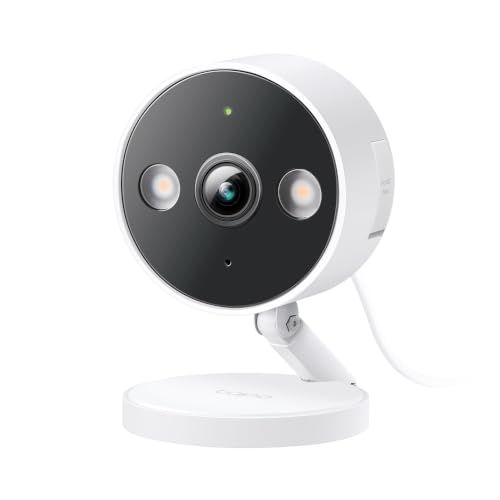
Tapo C120: Plug-In 2K for a Shelf by the Door
A plug-in camera that sits on a shelf, records to a microSD card and does not need a plan for its listed detection types. A strong default for an apartment entryway or living room.
According to Tapo, the C120 records 2560 x 1440 video, supports microSD cards up to 512 GB and runs on USB-C power with a 9.8 ft cable. Its detection list includes motion, person, pet, vehicle and tamper detection, and Tapo’s page marks Tapo Care cloud storage as the item that needs a subscription. For a renter, the useful extras are the custom privacy zones, which Tapo says completely block sensitive areas from recording, and the lack of any hub.
The field of view is 115.8 degrees diagonal, which suits a doorway, hallway or room corner, not a big open space. It connects to 2.4 GHz Wi-Fi only and works with Alexa, Google Assistant and SmartThings, not Apple Home. Read our Tapo C120 profile for the full specification list.
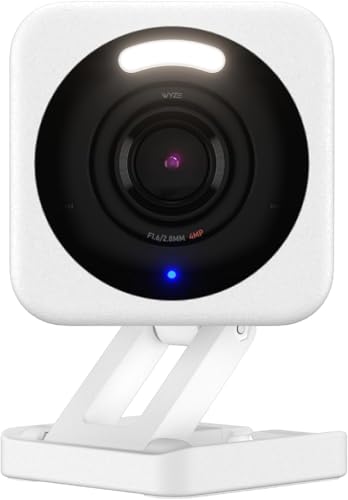
Wyze Cam v4: The Smallest of the Group
A compact, wired 2.5K camera with an adhesive magnetic mount option and local 24/7 recording to a microSD card. Good for small apartments where the camera should be unobtrusive.
Wyze lists the v4 at 2 x 2 x 2 3/8 inches and 0.49 lb, with 2.5K video, color night vision, two-way talk and a built-in siren. It ships with a 6 ft cable and an indoor power adapter. Mounting options include a stand, a wall or ceiling mount and a magnetic wall mount with adhesive, so you can attach a plate without anchors. Wyze says local 24/7 recording to a microSD card of up to 256 GB works without a plan, while person, pet, package and vehicle detection and cloud video storage need a Wyze plan.
That last point matters in an apartment. If you want an alert that says “person” and not just “motion,” budget for Cam Plus or accept motion alerts. Wyze also says the v4 supports 2.4 GHz Wi-Fi only. Our Wyze Cam v4 profile has the details, and it is the closest alternative to the Tapo C120.
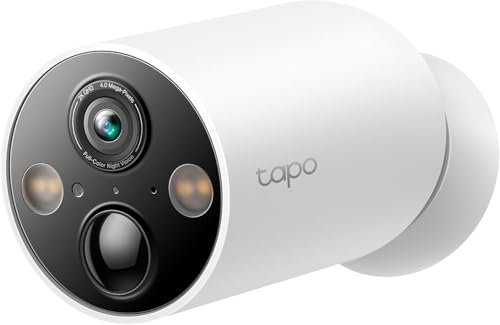
Tapo C425: For a Balcony or Patio With No Outlet
A battery-powered 2K camera with a magnetic base and no hub. It suits a balcony, patio or entry you control, where a power cord will not reach.
The C425 is wire-free. Tapo lists a built-in rechargeable battery, an adjustable magnetic base, IP66 weather resistance and microSD storage up to 512 GB. Tapo’s 300-day battery figure comes from a lab setup with 230 seconds of use per day, and the page itself shows it falling to 180 days at 360 seconds per day. A busy view drains the battery faster.
The base is fixed with supplied hardware, so mounting it on a wall is a modification. On a private balcony or patio you can set it on a ledge, but check your lease on exterior mounting and railings. Its 142-degree field of view covers a small outdoor space, and it should point at your own balcony, not at the neighbor’s. See the Tapo C425 profile for more.
Blink Outdoor 4: Only If You Accept a Plan
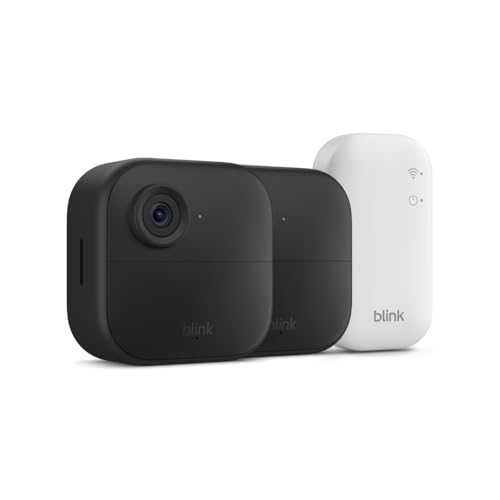
Battery-powered 1080p cameras that need no outlet. Pick this kit only if you are fine with a Blink plan for saved clips, or will add a separate Sync Module 2 for local storage.
Blink lists two AA lithium batteries per camera, rated up to two years under default settings, a 143-degree field of view and IP65 weather resistance. The catch for a renter who wants no subscription is storage. Blink says local storage starts automatically with a Sync Module 2 (USB drive) or Sync Module XR (microSD card), and the Sync Module Core included in this kit does not provide it. Without a plan you get live view, motion alerts and two-way audio. Cloud clips, kept up to 60 days according to Blink, and person detection need a plan. Blink also says the Outdoor 4 includes a 30-day trial of Plus.
That makes the kit a poor fit for strict no-fee shoppers, and a reasonable fit for a household that already uses Alexa and does not mind a plan. Details are in the Blink Outdoor 4 profile.
Placement Tips for Apartments
- Inside, facing the door. Put the camera on a shelf at about head height, a few feet from the entry, so it catches faces and not just the top of heads.
- Avoid windows aimed at neighbors. Glare is a problem at night, and a camera looking across a courtyard can see into other homes.
- Mask what is not yours. Use privacy or detection zones for windows, shared walls and doorways.
- Check Wi-Fi first. Tapo lists the C120 and C425 as 2.4 GHz only, and Wyze says the same for the v4. Blink’s support page does not state the band. Confirm that your router’s signal reaches the spot.
- Tell the people who live with you. Roommates, partners and regular guests should know where cameras are and whether they record sound.
How to Choose
- Want the cheapest no-plan setup for an indoor entryway? Start with the Tapo C120 or the Wyze Cam v4. Choose the Tapo if you want the larger card limit and the longer detection list; choose the Wyze if size and a spotlight and siren matter.
- Need a battery for a balcony? The Tapo C425 avoids both cable and hub.
- Fine with a monthly plan and already using Alexa? The Blink Outdoor 4 kit gives you two cameras with long battery life.
Whichever you pick, keep it pointed at your own space, leave audio off if your state requires all-party consent, and keep your lease in mind.
Sources
- Can Tenants Install Security Cameras? (SafeWise)
- Can Tenants Install Security Cameras? (eufy)
- Introduction to the Reporters Recording Guide (Reporters Committee for Freedom of the Press)
- Tapo C120 official product page and specifications (tp-link.com)
- Wyze Cam v4 official product page and tech specs (wyze.com)
- Tapo C425 U.S. product page (tapo.com/us)
- Blink Outdoor 4 camera FAQ (Blink Support)
- Blink Subscription Plans Compared (Blink)
Frequently asked questions
Do I need my landlord's permission to put a security camera in my apartment?
Usually not for a camera that sits inside your own unit. SafeWise says renters can in most cases install cameras inside their homes without asking. Permission is more likely to be needed for drilling, wiring, or mounting on the building exterior or in shared areas, so read your lease and ask if anything is unclear.
Can I point a camera at the hallway outside my apartment door?
That is the riskiest placement. Eufy notes that a shared hallway belongs to the building and that installing a camera there generally needs landlord approval. A camera inside your door that sees only your own entryway avoids most of the problem. Check your lease and any building rules first.
Is it legal to record audio with an apartment security camera?
It depends on the state. According to the Reporters Committee for Freedom of the Press, about 11 states primarily require every participant's consent to record a conversation, including California, Florida, Illinois, Massachusetts, Pennsylvania and Washington. If you are unsure, turn audio recording off and check your state's law. This is general information, not legal advice.
Which apartment cameras work with no monthly plan?
The Tapo C120 and Wyze Cam v4 record to a microSD card you supply, and the Tapo C425 does too. Each brand sells optional cloud storage or smarter detection, and Blink's Outdoor 4 kit with a Sync Module Core needs a plan for saved clips.
Can I use a camera without drilling holes?
Yes. A plug-in camera can sit on a shelf or ledge, and Wyze lists an adhesive magnetic wall mount for the v4. Adhesive can still mark paint, so ask your landlord if you worry about a deposit deduction.
How do I keep neighbors' homes out of the picture?
Aim the lens at your own space and use privacy or detection zones. Tapo lists custom privacy zones on the C120 that it says completely block sensitive areas from recording, and Wyze lists detection zones on the v4.